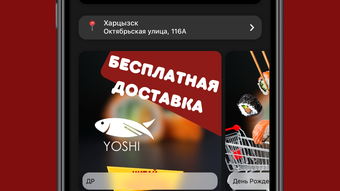

Order Sushi Instantly with YOSHI Sushi
Overview
YOSHI Sushi is a lifestyle mobile application designed for iPhone users seeking a convenient way to order sushi with minimal effort. Developed by MAKSIM NIIAZOV, the app operates within the Food & Drink category and is available at no cost. Its primary purpose is to streamline the food ordering process by offering immediate access to the full menu, customizable preparation times, and flexible delivery options. The app caters to busy professionals, students, and food enthusiasts who value time efficiency and digital convenience.
Users can create a personal account upon installation, unlocking access to a loyalty program that tracks bonus points and allows for future redemptions. This feature encourages repeat engagement and rewards consistent usage. The app also delivers real-time notifications about exclusive promotions, seasonal menu additions, and limited-time discounts, helping users stay informed and take advantage of special offers. While the developer did not provide additional details on target demographics beyond the iPhone user base, the app’s design suggests a focus on mobile-first, on-the-go consumers.
Real-world usage scenarios include ordering lunch during a work break, planning dinner for a family gathering, or grabbing a quick meal after a late night. The app’s integration with delivery logistics and user preferences makes it suitable for both spontaneous and planned orders. It serves as a digital extension of the YOSHI Sushi brand, enhancing customer experience through accessibility and personalized service.
Key Features & Capabilities
- Instant Menu Access – View the full sushi menu anytime, anywhere, without needing to visit a physical location or wait for a website to load.
- Customizable Preparation Time – Select the preferred time for food preparation, allowing users to align delivery with their schedule.
- Flexible Delivery Options – Choose from various delivery methods to suit individual preferences, including standard and express delivery.
- Loyalty Program Integration – Earn and track bonus points through a personal account, redeemable for future orders or discounts.
- Push Notifications – Receive timely alerts about exclusive deals, new menu items, and promotional events directly on the iPhone.
- Welcome Bonuses – New users receive initial rewards upon downloading the app, encouraging first-time use and engagement.
These features collectively enhance user experience by reducing friction in the ordering process. For example, a user can plan a dinner order in advance by setting a preparation time and selecting a delivery window, ensuring the meal arrives exactly when needed. The loyalty system fosters long-term engagement, turning one-time customers into repeat users. Push notifications keep users informed and motivated to return, especially during seasonal campaigns or flash sales. The personal account serves as a centralized hub for managing rewards and order history, promoting transparency and control.
User Interface, Workflow & Performance
The app’s user interface is designed for intuitive navigation, with a clean layout optimized for iPhone screens. Key functions such as menu browsing, order placement, and account management are accessible through a logical hierarchy of menus and icons. The workflow is streamlined to minimize steps between selecting an item and confirming an order, supporting fast decision-making.
Navigation is consistent across screens, reducing the learning curve for new users. The app’s responsiveness appears to be aligned with standard iOS performance expectations, though specific performance data was not provided. The developer did not specify resource usage details, such as CPU or RAM consumption, so general assumptions about efficiency are based on typical mobile app behavior. Stability is implied by the app’s release history, but no user reports or crash statistics were made available.
Users can expect a smooth experience when placing orders, with minimal lag during menu loading and checkout. The app integrates with Apple’s notification system to deliver timely alerts, which may impact background activity. Overall, the interface supports efficient task completion, making it suitable for both casual and frequent users. No issues related to freezing, crashes, or data loss were reported in the available information.
Compatibility & System Requirements
YOSHI Sushi is designed exclusively for iPhone devices, ensuring compatibility with the iOS ecosystem. The current version, 1.2.1, is available for download and installation on supported iPhone models. The app requires approximately 45.2 MB of storage space, which is relatively modest for a mobile application with multimedia content and interactive features.
Exact system requirements were not listed by the developer. This includes details on minimum iOS version, processor specifications, or memory thresholds. As a result, compatibility with older or newer iPhone models cannot be confirmed without further information. Users are advised to check their device’s app store for installation eligibility. The app is not available for other platforms such as Android, Mac, or Windows, limiting its reach to iOS users only.
Installation is straightforward through the Apple App Store, and updates are managed automatically. The app’s size and platform-specific design suggest it is optimized for mobile performance and battery efficiency. However, actual behavior under different conditions remains unverified due to the absence of technical specifications.
Pros and Cons
Pros
- Free to download and use, with no hidden costs
- Intuitive interface tailored for iPhone users
- Offers welcome bonuses to new users
- Includes a loyalty program with redeemable points
- Provides real-time notifications for promotions and new items
- Supports customizable preparation and delivery times
Cons
- Available only on iPhone, no Android or desktop support
- Exact system requirements not specified
- Performance details not disclosed by the developer
- Limited to a single platform, reducing accessibility
- No information on data privacy or security practices
FAQ Section
Is YOSHI Sushi available for Android devices?
Currently, the app is only available for iPhone users. There is no official Android version announced by the developer.
Can I use YOSHI Sushi without an internet connection?
Basic menu browsing may be possible offline, but placing orders and accessing real-time features such as delivery tracking or notifications require an active internet connection.
How do I earn and redeem bonus points?
Users earn bonus points through purchases made via the app. These points are stored in the personal account and can be redeemed for discounts or free items during future orders.
Does the app support automatic updates?
Yes, updates are managed through the Apple App Store. Users can enable automatic updates to ensure they always have the latest version.
Is my personal data secure when using YOSHI Sushi?
The developer did not provide specific details on data security or privacy practices. Users are advised to review the app’s privacy policy within the App Store listing.
Final Thoughts
YOSHI Sushi delivers a focused, user-friendly experience tailored to iPhone users who enjoy ordering sushi with ease. Its combination of instant menu access, customizable order settings, and a built-in loyalty system makes it a practical tool for regular food seekers. The inclusion of welcome bonuses and push notifications enhances engagement, encouraging repeat usage and loyalty.
While the app’s exclusivity to iPhone and lack of detailed technical information are notable limitations, its simplicity, affordability, and platform-specific optimization offer a compelling value proposition. It stands out as a reliable choice for those already invested in the Apple ecosystem and seeking a seamless digital dining experience.
For users looking to order sushi quickly and efficiently, YOSHI Sushi provides a solid solution with minimal friction. The app’s free model, combined with its thoughtful features, makes it accessible to a wide audience.
Download YOSHI Sushi now







